Tmux, the Window Manager for Terminal
Tmux, the Window Manager for Terminal

Tmux, the Window Manager for Terminal
tmux, a terminal multiplexer. tmux multiplex terminal into panes, windows withing a single terminal window.
tmux terminologies
Some tmux terminologies that seems confusing but they can be described as umbrella concept:
- Session: can contains multiple windows/group of windows
- Window: can contains multiple panes/group of panes
- Pane: the vertical or horizontal split in a window
Keybindings
Keybindings can be listed using this command:
# command
tmux lsk -N

# output
C-b Space   Select next layout
C-b !       Break pane to a new window
C-b "       Split window vertically
C-b #       List all paste buffers
C-b $       Rename current session
C-b %       Split window horizontally
C-b &       Kill current window
C-b '       Prompt for window index to select
C-b (       Switch to previous client
C-b )       Switch to next client
C-b ,       Rename current window
C-b -       Delete the most recent paste buffer
C-b .       Move the current window
C-b /       Describe key binding
C-b 0       Select window 0
C-b 1       Select window 1
C-b 2       Select window 2
C-b 3       Select window 3
C-b 4       Select window 4
C-b 5       Select window 5
C-b 6       Select window 6
C-b 7       Select window 7
C-b 8       Select window 8
C-b 9       Select window 9
C-b :       Prompt for a command
C-b ;       Move to the previously active pane
C-b <       Display window menu
C-b =       Choose a paste buffer from a list
C-b >       Display pane menu
C-b ?       List key bindings
C-b C       Customize options
C-b D       Choose and detach a client from a list
C-b E       Spread panes out evenly
C-b L       Switch to the last client
C-b M       Clear the marked pane
C-b [       Enter copy mode
C-b ]       Paste the most recent paste buffer
C-b c       Create a new window
C-b d       Detach the current client
C-b f       Search for a pane
C-b i       Display window information
C-b l       Select the previously current window
C-b m       Toggle the marked pane
C-b n       Select the next window
C-b o       Select the next pane
C-b p       Select the previous window
C-b q       Display pane numbers
C-b r       Redraw the current client
C-b s       Choose a session from a list
C-b t       Show a clock
C-b w       Choose a window from a list
C-b x       Kill the active pane
C-b z       Zoom the active pane
C-b {       Swap the active pane with the pane above
C-b }       Swap the active pane with the pane below
C-b ~       Show messages
C-b DC      Reset so the visible part of the window follows the cursor
C-b PPage   Enter copy mode and scroll up
C-b Up      Select the pane above the active pane
C-b Down    Select the pane below the active pane
C-b Left    Select the pane to the left of the active pane
C-b Right   Select the pane to the right of the active pane
C-b M-1     Set the even-horizontal layout
C-b M-2     Set the even-vertical layout
C-b M-3     Set the main-horizontal layout
C-b M-4     Set the main-vertical layout
C-b M-5     Select the tiled layout
C-b M-6     Set the main-horizontal-mirrored layout
C-b M-7     Set the main-vertical-mirrored layout
C-b M-n     Select the next window with an alert
C-b M-o     Rotate through the panes in reverse
C-b M-p     Select the previous window with an alert
C-b M-Up    Resize the pane up by 5
C-b M-Down  Resize the pane down by 5
C-b M-Left  Resize the pane left by 5
C-b M-Right Resize the pane right by 5
C-b C-b     Send the prefix key
C-b C-o     Rotate through the panes
C-b C-z     Suspend the current client
C-b C-Up    Resize the pane up
C-b C-Down  Resize the pane down
C-b C-Left  Resize the pane left
C-b C-Right Resize the pane right
C-b S-Up    Move the visible part of the window up
C-b S-Down  Move the visible part of the window down
C-b S-Left  Move the visible part of the window left
C-b S-Right Move the visible part of the window right
Configuration
Configuration file for tmux is ~/.tmux.conf, but any file can be configuration file but have to source in the ~/.tmux.conf.
Customization
Philosophy:
- Don’t alter the default Keybindings
- There is no tpm, tmux plugin manager, plugins I use, It just add more distruction & load time.
- I like the ui customization but also don’t like to maintain it often. So, I stick with this this ui for a while. Here’s what is use as my configuration:
##### REQUIREMENTS #####
# Nerd Font required for arrows & icons
##### tmux color ##
set -g default-terminal "tmux-256color"
set -g terminal-features 'xterm*:RGB,alacritty:RGB,kitty:RGB,wezterm:RGB,foot:RGB'
##### MOUSE MODE #####
set -g mouse on
##### VIM Keybindings #####
set -g mode-keys vi
##### History Limit #####
set -g history-limit 100000
##### THEME COLORS #####
# Accent color (gold theme)
set -g @tc "#00abab"
# Grays
set -g @g0 "#262626"
set -g @g1 "#303030"
set -g @g2 "#3a3a3a"
set -g @g3 "#444444"
set -g @g4 "#626262"
##### ICONS #####
set -g @rarrow ""
set -g @larrow ""
set -g @user_icon ""
set -g @session_icon ""
set -g @time_icon ""
set -g @date_icon ""
set -g @icon_cpu ""
##### BASIC STATUS BAR #####
set -g status on
set -g status-interval 1
set -g status-style "bg=#{@g0},fg=#{@g4}"
set -g status-position top
##### LEFT STATUS #####
set -g status-left-length 150
set -g status-left-style "bg=#{@g0}"
set -g status-left "\
#[fg=#{@g0},bg=#{@tc},bold] #{@user_icon} #(whoami)@#h \
#[fg=#{@tc},bg=#{@g2}]#{@rarrow}\
#[fg=#{@tc},bg=#{@g2}] #{@session_icon} #S \
#[fg=#{@g2},bg=#{@g0}]#{@rarrow}\
"
##### RIGHT STATUS #####
set -g status-right-length 150
set -g status-right-style "bg=#{@g0}"
set -g status-right "\
#[fg=#{@g2}]#{@larrow}\
#{?client_prefix,#[fg=#{@g3}],}#[fg=#{@tc},bg=#{@g1}]#{@icon_cpu} #(top -bn1 | grep 'Cpu(s)' | awk '{print int($2+$4)}')% \
#[fg=#{@g2}]#{@larrow}\
#[fg=#{@tc},bg=#{@g2}] #{@time_icon} %H:%M \
#[fg=#{@tc},bg=#{@g2}]#{@larrow}\
#[fg=#{@g0},bg=#{@tc}] #{@date_icon} %d-%b \
"
##### WINDOW TABS #####
set -g window-status-separator ""
set -g window-status-format "\
#[fg=#{@g0},bg=#{@g2}]#{@rarrow}\
#[fg=#{@tc},bg=#{@g2}] #I:#W#F \
#[fg=#{@g2},bg=#{@g0}]#{@rarrow}\
"
set -g window-status-current-format "\
#[fg=#{@g0},bg=#{@tc}]#{@rarrow}\
#[fg=#{@g0},bg=#{@tc},bold] #I:#W#F \
#[fg=#{@tc},bg=#{@g0},nobold]#{@rarrow}\
"
set -g window-status-style "fg=#{@tc},bg=#{@g0}"
set -g window-status-last-style "fg=#{@tc},bg=#{@g0},bold"
set -g window-status-activity-style "fg=#{@tc},bg=#{@g0},bold"
##### PANE BORDERS #####
set -g pane-border-style "fg=#{@g3}"
set -g pane-active-border-style "fg=#{@tc}"
##### PANE NUMBER DISPLAY #####
set -g display-panes-colour "#444444"
set -g display-panes-active-colour "#ffb86c"
##### CLOCK MODE #####
set -g clock-mode-colour "#ffb86c"
set -g clock-mode-style 12
##### MESSAGES #####
set -g message-style "fg=#{@tc},bg=#{@g0}"
set -g message-command-style "fg=#{@tc},bg=#{@g0}"
##### COPY MODE #####
set -g mode-style "bg=#{@tc},fg=#{@g4}"
##### WINDOW BACKGROUND #####
set -g window-style "bg=default"
set -g window-active-style "bg=default"Showcase
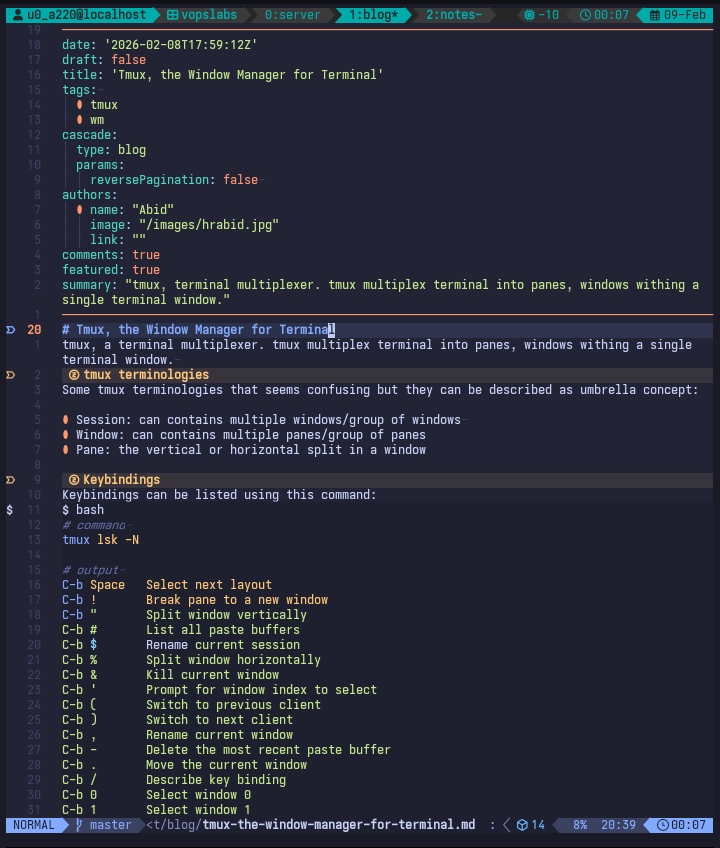
The ui now look like this:
Last updated on